
The defense
The thread of the Part One defense, in the order the subject asks for. Each part says who presents, what to show, and links to the details in these docs.
The projected presentation
Open the presentation: arrows ← → to navigate, F for full screen, N for the speaker notes.
| # | Part | Presented by |
|---|---|---|
| 1 | The need and the sample | Elias |
| 2 | Technical choices | each their own brick |
| 3 | The repository and the environments | Elias |
| 4 | The API | Patrice |
| 5 | The front end | Jean-Baptiste |
| 6 | The pipeline | Elias |
| 7 | The runners | Elias |
| 8 | Secrets security | Elias |
| 9 | The demo | Elias, with the team |
| 10 | The bonuses | Elias |
1. The need and the sample
“There should be two tasks for a human being to perform to deploy software: to pick the version and environment and to press the deploy button.”
— David Farley, Continuous Delivery, quoted by the subject
In our project:
| The task | What it is |
|---|---|
| Pick the version | the commit: each image carries its SHA |
| Pick the environment | the branch: develop → dev, main → prod |
| Press the button | the merge request's merge, or Re-deploy to go back |
The sample is the back office of a grocery chain: one page that lists, adds and deletes products.
Online: https://trinity.jostud.com, https://dev.trinity.jostud.com and these docs at https://docs.trinity.jostud.com.
2. Technical choices
| Need | Choice | Why |
|---|---|---|
| API | Django + Django REST Framework, Gunicorn | Patrice's strength; a full CRUD in a few lines |
| Web | Next.js, server-side rendering | Jean-Baptiste's strength; the API address stays on the server |
| Database | PostgreSQL 17 | standard, official image |
| CI/CD | GitLab CI + self-hosted runners | asked by the subject; the jobs run on our machines |
| Containers | Docker: Compose in dev, Swarm in prod | Swarm gives zero downtime and rollback with no home-made script |
| Traffic entry | Traefik v3.6 + Let's Encrypt | automatic HTTPS, one route per file |
| Servers | 2 Google Cloud VMs, configured by Ansible | dev isolated from prod; replayable configuration |
Key point: the code tools are the ones the team masters, to keep the time for DevOps, which is what is graded. Details: Technical choices.
3. The repository and the environments
One GitLab repository, one part per folder:
trinity-devops/
├── .gitlab-ci.yml        the root pipeline
├── api/                  Django, Dockerfile.dev, Dockerfile.prod, its CI jobs
├── web/                  Next.js, Dockerfile.dev, Dockerfile.prod, its CI jobs
├── docs/                 these docs (VitePress)
└── infra/
    ├── ansible/          4 roles: docker, ufw, traefik, gitlab-runner
    ├── traefik/          configuration and dev / prod routes
    ├── docker-compose.dev.yml
└── docker-compose.prod.ymldevelopandmainare protected: no direct push, everything goes through a merge request.- GitLab copies the repository to the school's GitHub on every push (mirror).
| Dev | Prod | |
|---|---|---|
| Machine | trinity-dev (e2-medium) | trinity-prod (e2-small) |
| Started with | docker compose up --build | docker stack deploy (Swarm) |
| Images | built on the spot, Dockerfile.dev | pulled from the registry: api:<sha>, web:<sha>, docs:<sha> |
| Servers | runserver, next dev | Gunicorn, node server.js |
| Containers | root, DEBUG=True | non-root, DEBUG=False, health check |
| Update | short outage | zero downtime, automatic rollback |
Details: Dev and prod environments, Overall architecture.
4. The API
Presented by Patrice.
| Topic | To show |
|---|---|
| Structure | the products app: model, serializer, ModelViewSet; /api/products/ as a CRUD; /health for the probes |
| Dev | Dockerfile.dev: one stage, runserver, migrations run by Compose |
| Prod | Dockerfile.prod: two stages, Gunicorn with 3 workers, appuser user, health check; entrypoint.sh runs migrate and collectstatic |
| Tests | 7 pytest-django tests, JUnit report and coverage visible in the merge request; flake8 at lint |
Details: API overview.
5. The front end
Presented by Jean-Baptiste.
| Topic | To show |
|---|---|
| Structure | the page is rendered on the server; adding and deleting go through Server Actions; the browser never talks to the API directly |
| Dev | Dockerfile.dev: next dev |
| Prod | Dockerfile.prod: three stages, standalone build, node server.js, nextjs user, health check on /api/health |
| Tests | 18 Jest and Testing Library tests, JUnit report and coverage; ESLint at lint |
Details: Web front end overview.
6. The pipeline
| Push to | lint and test | image build | deployment |
|---|---|---|---|
feature/* | if the folder changed | no | no |
develop | if the folder changed | yes, every time | dev |
main | if the folder changed | yes, every time | prod |
The points to make:
- Each part has its own jobs file (
api/.gitlab-ci.yml,web/.gitlab-ci.yml,docs/.gitlab-ci.yml), included by the root file: everyone moves forward without touching the others' jobs. - Tests are readable: JUnit reports in the Tests tab and coverage in the merge request.
- Each deployment checks itself:
curlon/healththrough Traefik and HTTPS. In prod, the job also checks that Swarm runs the commit's images, or it fails.
Details: The pipeline, From a commit to prod.
7. The runners
| Runner | Machine | Executor | Tag | Runs |
|---|---|---|---|---|
trinity-dev-runner | trinity-dev | docker, privileged | none | lint, tests, builds |
trinity-dev-deploy | trinity-dev | shell | dev | deploy-dev |
trinity-prod-deploy | trinity-prod | shell | prod | deploy-prod |
The proof of connection, to show in this order:
- GitLab, Settings > CI/CD > Runners: the three runners are online, and GitLab's shared runners are disabled.
- A finished job: the first line of the log names the runner, for example
on trinity-dev-runner. - The simple test: a merge request touching
api/runsapi:lintandapi:teston our runner.
To say: the runners are installed and registered by Ansible, with their tokens in the Vault. They fetch work from GitLab: no connection comes into the servers, and no deployment SSH key exists.
Details: Runners.
8. Secrets security
| Measure | How |
|---|---|
| No secret in the repository | database passwords and the Django key in GitLab CI/CD variables: masked, protected, hidden, one value per environment |
| Runner tokens | encrypted in Ansible Vault, password passed on outside Git |
| No deployment key | the deploy runners run on their server and call GitLab |
| Containers | prod runs non-root; only Traefik publishes ports; the database is only on an internal network |
| Network | Google Cloud firewall then UFW: 22, 80, 443; SSH key only |
| Transport | HTTPS everywhere, Let's Encrypt certificates, 80 → 443 redirect |
| Branches | develop and main protected: only merges trigger a deployment |
Details: Secrets and access, Flow matrix, Infrastructure.
9. The demo
Tabs to open beforehand: GitLab (Pipelines, Operate > Environments), the prod site, the dev site, Datadog, and a terminal.
A small change on a
feature/*branch, then a merge request todevelop: lint and tests pass, the test report shows in the merge request.The merge into
develop: builds, thendeploy-dev. Show the change on https://dev.trinity.jostud.com.Start the counter in the terminal, and leave it running until the end:
shu=https://trinity.jostud.com/api/health; ok=0; ko=0 while true; do c=$(curl -s -m 5 -o /dev/null -w "%{http_code}" $u) [ "$c" = 200 ] && ok=$((ok+1)) || ko=$((ko+1)) printf "\rOK: %d errors: %d" $ok $ko; sleep 0.2 doneThe merge into
main:deploy-prodreplaces the containers one at a time. The error counter stays at 0.The rollback: Operate > Environments > prod, Re-deploy button on the previous deployment. Prod goes back to the old version, still without errors.
Datadog: the demo's pipeline and the duration of each stage.
Before the demo
Do a full rehearsal the day before: the develop then main pipelines take about 15 minutes each. Have the merge request to main already open.
10. The bonuses
Load balancer
In prod, the API and the web run as two instances. Traefik sends requests to the Swarm service, which spreads them between its tasks. An update replaces the tasks one at a time. Details: Zero-downtime deployment.
Pipeline monitoring
The GitLab → Datadog CI Visibility integration sends every pipeline and every job: duration, status, stage by stage. No agent to install: the API key is stored, encrypted, in the GitLab integration.
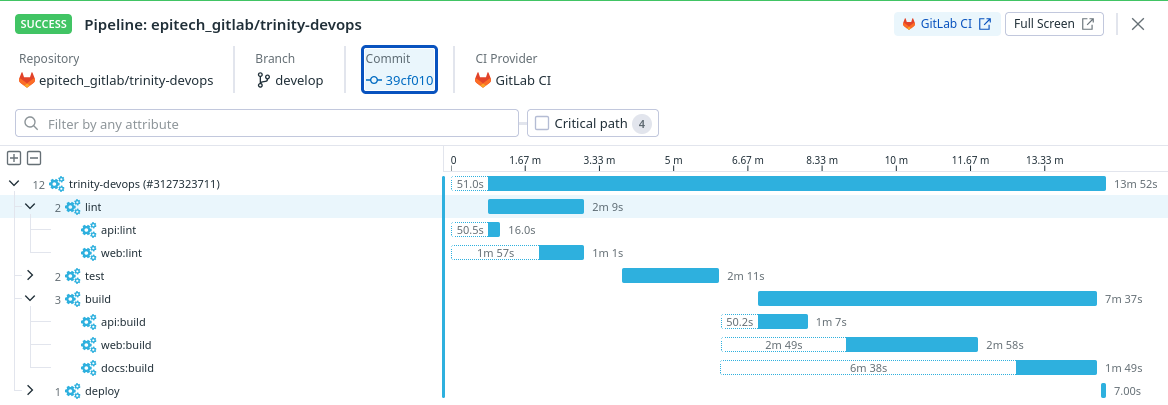
What Datadog showed: the hatched parts are waiting. The CI runner runs one job at a time (concurrent = 1), so docs:build waits 6 min 38 before starting. It is the simplest improvement to shorten the pipeline.
Log persistence
Not done: the logs stay in the containers. See Limits and improvements.
Extras
- These docs are published by the pipeline, at https://docs.trinity.jostud.com.
- The mirror to the school's GitHub is automatic.
The numbers to remember
| Number | What it measures |
|---|---|
| 0 errors in 1,268 requests | a real prod release, measured during the deployment |
| 13 min 52 | a full develop pipeline, according to Datadog |
| about 1 min | the deploy-prod job |
| 25 tests | 7 for the API, 18 for the web |
| 3 runners | on 2 VMs, no GitLab shared runner |
| 566 → 283 MB | the API dev image, after the cleanup |
Likely questions
| Question | Short answer |
|---|---|
| Why Swarm and not Kubernetes? | Swarm is built into Docker: zero downtime, rollback and load balancing in a few lines. Kubernetes is oversized for one VM |
| Why a runner on each server rather than a job that connects over SSH? | No SSH key to store at GitLab, and nothing comes into the servers |
| What if the new version is broken? | Its health check fails, Swarm keeps the old one, and the job fails: the pipeline turns red |
| Where are the passwords? | In the GitLab variables, masked and protected, injected at deployment; never in a file |
| Why does dev rebuild its images? | To test the code in development mode; prod uses the images built once by the pipeline |
| How to go back to a previous version? | Environments > prod > Re-deploy: each commit's images stay in the registry |
| Why two VMs? | An error or a load spike in dev never touches prod |
| What is missing? | Automatic secret scanning, database backup, log persistence, a second node. See Limits |